

How to Top Up Conquer Points via Card4Games

Conquer Online, set in the world of ancient China, is a free-to-play 2.5D MMORPG. Within the beautiful and opulent world of fantasies, you will control a strong and gallant hero, slaying outrageous monsters, completing dangerous quests, and having the most fun in your life.
Conquer Points are like special in-game points that can be used to personalize your character with the marketplace Shopping Mall in Conquer Online. Conquer Points can also be obtained by exchanging with in-game items like gems, rebirth tokens, experience balls, dragon balls, and more.
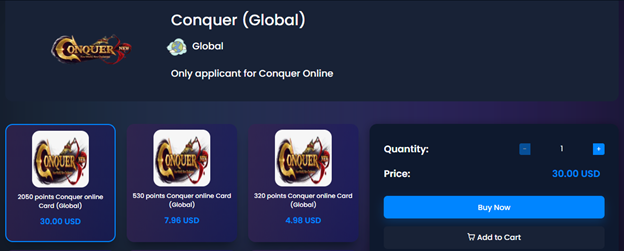
Step 1: Register or log in to card4games, then search “Conquer”
Step 2: Select the CP Card that matches your region and the amount you need.
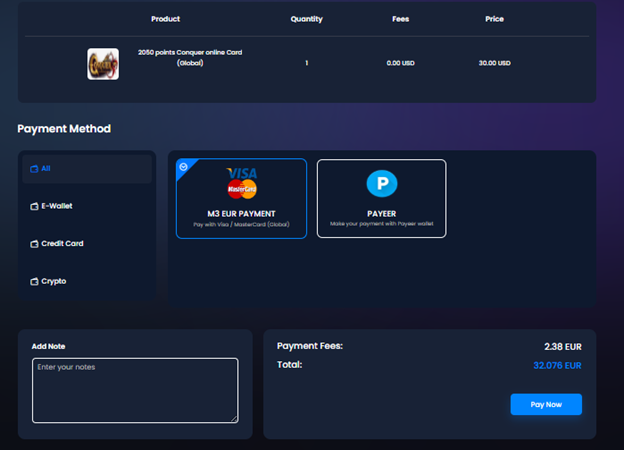
Step 3: Add it to your cart and proceed to secure checkout.
Step 4: After payment, you will receive the Conquer Points PIN instantly via email or in your account dashboard.
Important Notes:
- Make sure you select the correct region when purchasing the card.
- Codes are usually non-refundable once delivered.
- If you face any issues, contact Card4Games Support for help.
Thanks you
You may visit the Card4games Support for quick answers and guides.
Need Support? Contact our Customer Support sales@card4games.com