

How to redeem Free Fire Diamonds Pins (EU+TR)

If you have purchased a Garena Free Fire Diamonds Pin
for the European (EU) or Turkish (TR) region,
follow these steps to add
diamonds to your account.

🔹 Step 1: Visit the Redemption Website
Go to the official Garena Free Fire Redemption Center.
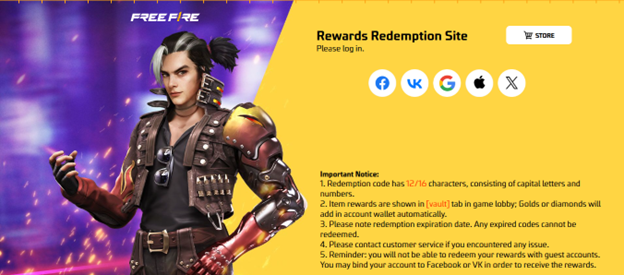
🔹 Step 2: Log into Your Free Fire Account
- Use your preferred login method:
- VK
- Huawei ID
- Apple ID
🔹 Important: You cannot redeem the code if you are using a Guest Account. Link your account first!
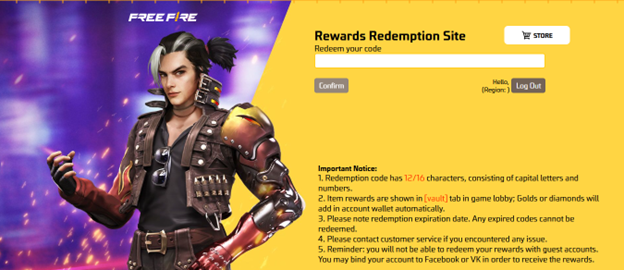
🔹 Step 3: Enter the Redeem Code
- In the provided field, enter the 12-character pin you received from Card4Games.
- Click "Confirm" and wait for the confirmation message.
🔹 Step 4: Check Your Free Fire Account
- Once successful, diamonds will be added to your Free Fire wallet within a few minutes.
- Open the game and verify your balance.
⚠️ Important Notes
✅ Region Lock: Ensure your Free Fire account matches the EU or
TR region before redeeming.
✅ One-Time Use: Each code can only be used once.
✅ No Refunds: After redemption, the transaction cannot be
reversed.
✅ Expiration Date: Some codes may have an expiry date—redeem
them as soon as possible.
· Need more Free Fire Diamonds? Purchase securely from Card4Games and top up your game instantly.
Thank You
You may visit the Card4games Support for quick answers and guides.
Need Support? Contact our Customer Support sales@card4games.com