

How to redeem Fortnite V-Bucks Card purchased in Card4games ?

V-Bucks are an in-game currency used in Fortnite, which Epic Games recently launched. V-bucks cards can be redeemed by gamers on various platforms such as PlayStation, XBOX, Nintendo Switch, PC/Mac, and Mobile to purchase things like outfits, pickaxes, wraps, emotes, and Battle Passes.
Step 1: Once completed the purchase from Card4games, kindly retrieve your game card code
Step 2: Go to the Epic Games website and log in to your Epic Games - Fortnite account.
Step 3: Enter the code exactly as shown, then click Next.
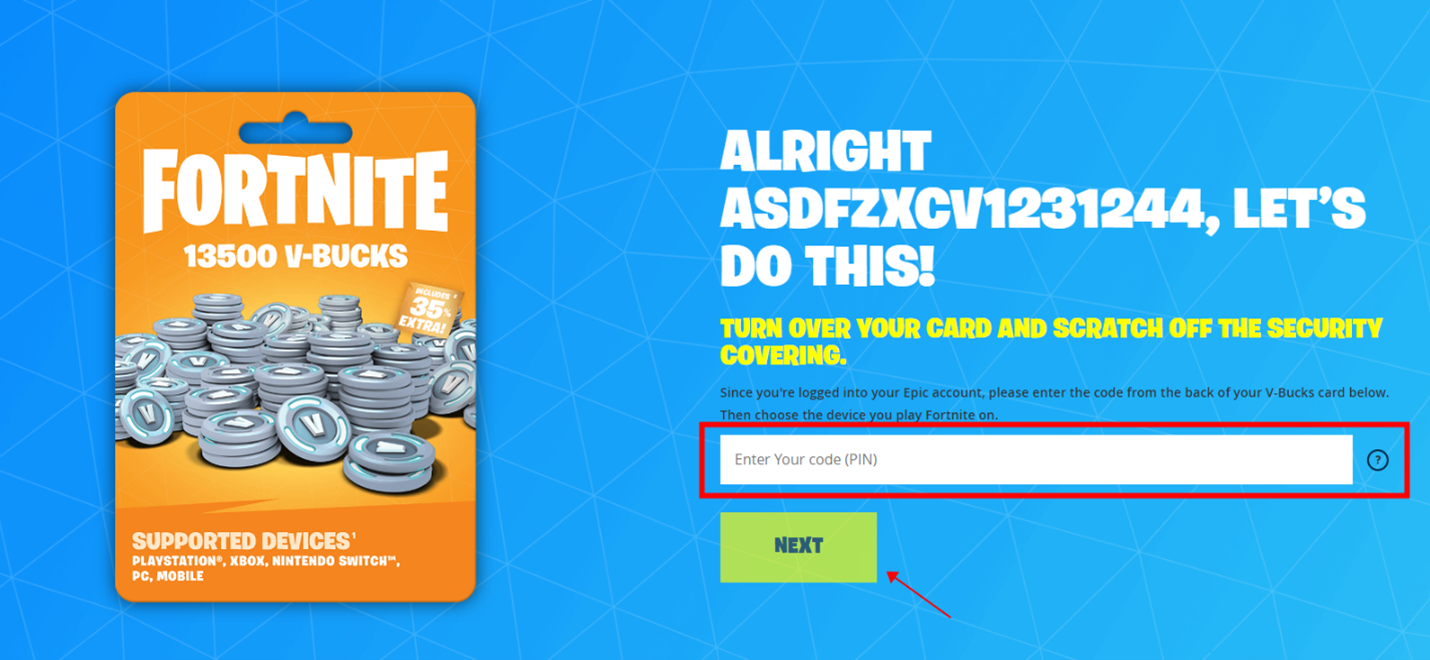
Step 4: Choose the platform (PC, PlayStation, Xbox, etc.) where you want the V-Bucks delivered.
Step 5: Click Confirm to redeem your V-Bucks.
Important Note:
You can’t redeem the card directly through your console (PS/Xbox/Switch). You must redeem through the Epic Games website and then choose the correct linked platform.
Buy more Fortnite Cards from:
Thank You
You may visit the Card4games Support for quick answers and guides.